OpenAI now lets businesses claim a profile inside ChatGPT. For online retailers in the UK, here’s which route to take, what’s involved and what to expect.
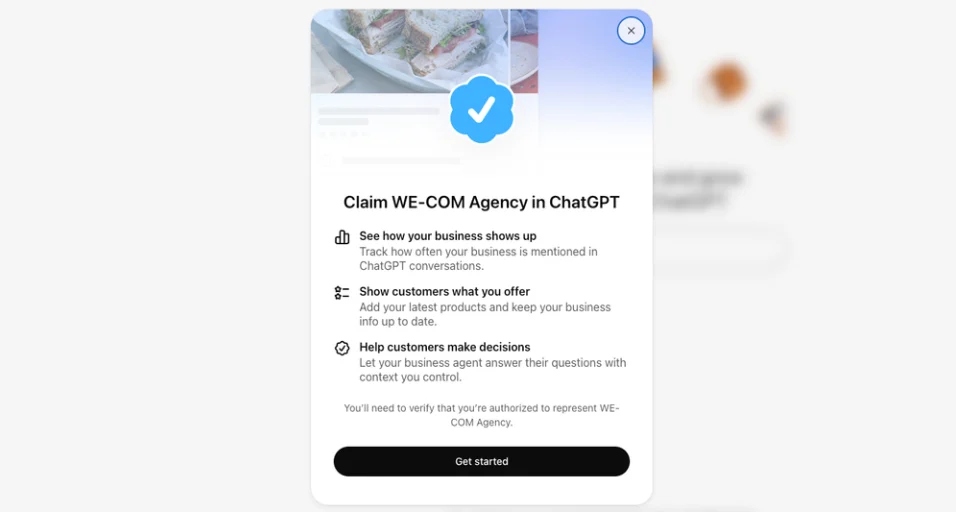
On Tuesday 10th November, OpenAI launched Businesses in ChatGPT in beta. It centres on a new Business Hub, where businesses can claim their profile, keep their details up to date and see how ChatGPT mentions them. OpenAI is pitching it as a way to reach the 1.2 billion people it says use ChatGPT each week.
Most of the coverage so far treats businesses as either local or online. Most of the retailers we work with are both. They sell online, but they also have a head office, a warehouse or a few shops, and Business Hub handles those very differently.
This post is based on OpenAI’s own help documentation, the early reporting and our experience of claiming an e-commerce store through the new process.
Online stores and physical premises are treated separately
Business Hub has two routes: one for online businesses and one for physical locations. OpenAI treats them as different businesses, with different rules.
Online businesses can claim an existing listing or create a new one using the Create option. This is the route for e-commerce, and it’s where your product feed, delivery and returns policies, and online visibility data sit. When we used Create for an e-commerce store, it went through without a problem.
Physical locations are much more restricted. OpenAI says local stores and restaurants can currently claim only an existing US listing. For a UK business, choosing a physical location currently leads to a waiting list.
Your head office address may not be the right starting point
When you search for your business in Business Hub, your registered office, warehouse or showroom may come up as a listing. It looks like the obvious choice, but selecting it puts you on the physical-location route, and that’s where UK claims stall.
If you sell online, choose Create instead and add your business as an online store. If you’ve already been waitlisted after selecting a physical location, you can start again using Create.
Your shops are separate from your online store
If you have shops as well as an online store, claiming one doesn’t cover the other. OpenAI says claiming the main brand doesn’t claim its locations, and there’s currently no way to manage a parent company’s brands and locations together. Larger brands may go through a managed claim process, where individual location profiles stay locked by default.
For UK retailers, this means you can claim the online store now, but your shops will have to wait until local claims open up outside the US.
The two are also measured differently. For an online store, a mention only counts when ChatGPT references your website. For a shop, a mention counts whenever ChatGPT shows a result for that location, even if nobody opens the listing. If you do get both later, don’t compare their figures directly.
Business Hub works like Google Business Profile
The easiest comparison is Google Business Profile. Business Hub sits in the ChatGPT sidebar, and if you own a business or are authorised to represent it, you can claim its profile and manage the information ChatGPT has about you.
There are three parts to it:
- A claimed profile, with your description, category, logo, contact details, and delivery and returns policies.
- A product feed, with prices and availability, connected through Shopify, a CSV file or a hosted URL.
- Insights, showing mentions, website clicks and discovery topics over the past 28 days.
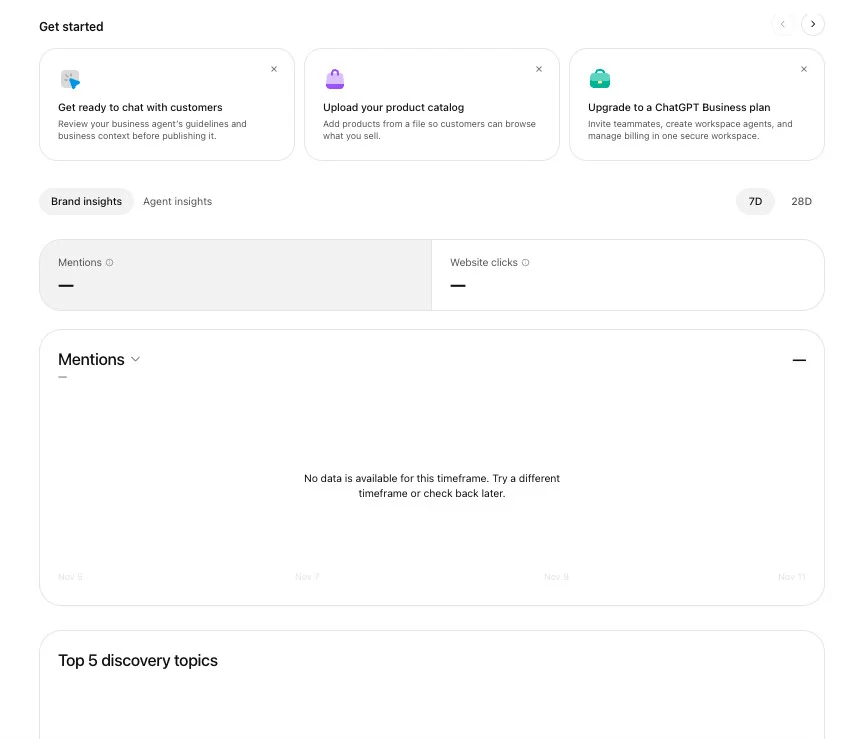
Claiming is free. OpenAI says you don’t need an Ads account or a ChatGPT Enterprise agreement to claim an eligible business, and you don’t need to advertise or publish an agent to use your profile and insights.
Claiming a profile won’t get you recommended more often
This is the most important thing to understand before you put time into it.
OpenAI states that claiming lets you manage the information you provide, but it doesn’t guarantee increased visibility or give you direct control over ChatGPT’s independent recommendations. The same goes for product feeds: connecting one doesn’t guarantee ChatGPT recommends your products. And OpenAI says advertising doesn’t influence ChatGPT’s independent answers either.
That makes Business Hub closer to housekeeping than a new growth channel. It’s a way to make sure ChatGPT has accurate information about your store. It’s worth doing because it’s free and fairly quick, but it isn’t something you can optimise your way to the top of.
There are three stages to getting set up
1. Use Create to add your online store
Search for your business in Business Hub, or choose Create to add it as an online store. You then verify your connection to the business using one of the methods offered: your business phone, business email, website domain or Shopify store.
If you verify by domain, ChatGPT shows you a TXT record to add to your domain’s DNS settings. Copy the type, name and value exactly. If someone else manages your domain, such as your developer or hosting provider, ask them to add it. DNS changes can take a while to show up, so if verification doesn’t work straight away, give it time and select Verify domain again.
2. Verify your identity
Before you can publish any changes, connect a product feed or view insights, the profile owner has to verify their identity through Persona, OpenAI’s verification partner. Expect to provide a government-issued ID, and possibly business registration details and proof that you can represent the business.
Your profile only gets the blue verified tick once this is approved. Decide who’ll own the profile before you start, because it’s tied to their identity.
3. Update your details
Once you’re verified, you can add your description, category, logo, contact details, and delivery and returns policies. The description is optional, and OpenAI says it’s there so ChatGPT can share it in conversations when it’s helpful or relevant. In other words, it’s information ChatGPT can draw on, not a listing it has to show.
OpenAI reviews changes before they go live, and ChatGPT may also use other sources when answering questions about your business. Don’t expect edits to show up in answers straight away.
Product feed quality matters
For retailers, the product feed is the part most likely to matter. Until now, ChatGPT built its picture of your range from whatever it could crawl or cite. A feed lets you share accurate prices and availability directly.
The problems that hold back a Merchant Center feed, such as vague titles, missing attributes, inconsistent categories and out-of-date stock, will probably hold you back here too. If your team has always treated the feed as a paid media job, it’s worth treating it as an organic one as well.
Read the insights carefully
Insights show mentions, website clicks and discovery topics. They’re the first visibility data ChatGPT has shared with businesses directly, but OpenAI is careful about what the numbers mean, and you should be too.
For an online store, a mention only counts when ChatGPT references your website. Your brand name on its own doesn’t count. Website clicks are recorded clicks on links to your site, and OpenAI says plainly that they don’t confirm visits or conversions. Discovery topics group the themes of answers that mentioned you, so you won’t see individual prompts or customer conversations.
Don’t worry if your dashboard is empty at first. OpenAI says a blank metric can mean activity hasn’t reached the reporting threshold, data is still being collected or reporting isn’t available yet. It doesn’t necessarily mean zero.
Treat these figures as early signs of visibility, not proof of traffic or sales. Your own analytics remain the source of truth.
Business Agents are US only (and can’t sell for you)
OpenAI also launched Business Agents, labelled chats inside ChatGPT that answer customer questions using your product and policy information. For now, they’re limited to eligible ecommerce and online service businesses in the US.
Even in the US, they’re limited. An agent can explain your products and policies and link to your website, but it can’t complete purchases, take bookings or check orders. Agent chats are also kept separate from ChatGPT’s own answers, so building one won’t change how ChatGPT describes you elsewhere.
For UK retailers, this is one to watch rather than act on.
What we’d do this week
Follow the link here, and a few steps will cover it:
- Use Create to add your online store, even if your head office or a shop comes up first. Leave your shops for now. They’re separate profiles, and UK locations can’t be claimed yet.
- Get the right people ready. That means whoever manages your DNS, if you verify by domain, and whoever will verify their ID and own the profile.
- Check your details once you’re verified, especially delivery and returns policies, descriptions and categories.
- Check your product feed before you connect it, and fix titles, attributes and stock accuracy first.
- Record a baseline when insights appear, without making decisions from beta data.
Other than this list, the things that shape how AI tools describe your store haven’t changed: accurate product data, clear content and genuine authority across the web.
If you want a clear view of how your site actually performs in organic and AI search against the competition, you can request a free audit or arrange a quick call with our team.