

Most e-commerce teams approach internal linking as a technical fix. The trouble is, the most common internal linking problems are not deep structural failures. They are housekeeping failures and having the wrong priorities, and confusing these means teams often waste time.
Internal linking is one of the more controllable factors in e-commerce SEO. That is not the same as saying it is the most important one. But because it sits entirely within your CMS, whether that is Shopify, Magento or WordPress. It’s also one of the areas where small, deliberate fixes produce reliable, measurable improvement.
This W.T.F. article covers where most stores actually go wrong, what internal link types carry the most weight, and how to think about link decisions on your category and product pages, without a single arbitrary rule about how many links a page should have.
Key takeaways
- A page with no internal links pointing to it will usually still be crawled if it sits in your sitemap, but nothing on your site is telling Google it matters.
- Navigation and footer links appear sitewide but are widely understood to carry diminishing individual value. In-content links are your most controllable territory.
- Linking to filtered or parameter-based URLs is one of the most common mistakes in e-commerce, and it is almost always human error.
- A link only counts if Googlebot can follow it. Buttons, click handlers and “load more” controls are not links.
- The right number of internal links from any page is determined by what that user genuinely needs next, not by a formula.
- Auto-generated “you may also like” modules are largely wasted linking opportunities, and making them editorially deliberate turns a passive feature into a real signal.
What internal linking actually does (and what it does not do)
An internal link is a link from one page on your site to another. That is all it is. But internally linking your pages well does three things at once – it helps users navigate, it helps search engines discover and crawl pages, and it communicates the relationship between topics across your site.
That third function is where the concept of topical authority comes in. It is worth being clear about what that means. It is not a confirmed ranking mechanism with a named Google signal behind it. It is a working model, and a useful one, for describing how a search engine builds an understanding of what your site covers and how confidently it covers it. Your internal links are part of the evidence it uses. Signal them poorly and you leave that understanding to chance.
What internal linking does not do is compensate for weak content, poor site structure or a lack of external authority. It is a factor among many, and treating it as anything more will lead you to over-invest in it at the expense of things that matter more.
The link types that carry the most weight on an e-commerce site
Not all internal links are equal, and treating them as interchangeable is one of the more consistent errors we see in e-commerce internal linking strategy.
Your main navigation carries the most weight by volume. A link in your main navigation points to a category or collection page from every single page on your site, assuming your navigation has been implemented correctly. The same is true of footer links.
That sitewide repetition amplifies the signal for those pages. The working assumption across the industry, supported by Google’s reasonable surfer patent and by what Google has said about boilerplate links, is that it also dilutes the individual value of each one. Treat that as a model rather than a confirmed mechanism, in the same way as topical authority above. It is a sound basis for prioritising, not a law.
The most interesting and controllable territory for most stores is in-content linking. Links within category page copy, subcategory pages, product descriptions, and supporting editorial content. Once search engines have a clear read on your site’s overall structure through navigation and footer, the rest of their understanding of how your pages relate to each other comes from the links within your content. That is where deliberate decisions make a difference.
Breadcrumbs sit in a category of their own. They are valuable primarily because they help users understand where they are within your site hierarchy and navigate back through it. The SEO benefit follows from that, not the other way around.
Where most e-commerce stores go wrong
The most common internal linking problems in e-commerce are not evidence of a poor strategy. They are evidence of inconsistent execution, usually by multiple people editing a CMS over several years without a clear shared standard.
The first and most damaging problem is orphaned pages, pages that exist on your site but have no internal links pointing to them. Googlebot discovers pages in several ways, and following links in your code is only one of them. Google’s own documentation confirms that a sitemap helps search engines discover URLs, while stopping short of guaranteeing that everything listed will be crawled and indexed.
So an orphaned page in your sitemap will usually be found. The problem is what happens next. A sitemap entry tells Google a page exists, an internal link tells Google it matters.
Nothing on your site is vouching for that page, so it tends to be crawled less often and rarely performs, and in our experience auditing e-commerce clients across a range of categories, orphaned pages are one of the most consistent findings.
The second problem is broken internal links, links that point to pages which no longer exist or which route through multiple redirects because a page has moved.
James Mechan, WE-COM’s Strategy and Delivery Director, has led delivery across major e-commerce accounts and his observation is direct:
“Every time we look at an e-commerce store, there are links pointing to pages that no longer exist. That is fully within your control, and it should be the first thing you look at for internal linking.”
To be clear about why it matters. Google has been consistent that 404s are a normal part of the web and do not damage your rankings in themselves. The cost of a broken internal link is more immediate than that. It is a dead end for a user who was trying to get somewhere, and whatever signal that link was carrying goes nowhere at all.
The third problem is linking to non-indexable or non-canonical URLs. E-commerce platforms routinely generate URL variants when a user filters by price, colour or sort order. If someone on your team copies one of those filtered URLs and hard-codes it as an internal link, the consequence depends on how that variant is handled.
If it canonicalises to the clean URL, Google consolidates the signals to the canonical, so the link is not wasted, but it is indirect and it burns crawl budget getting there. If the variant is blocked in robots.txt, it is a genuine dead end, because Google cannot fetch the page to see the canonical tag at all. If it is set to noindex, it gets crawled and dropped. In the same guidance, Google is explicit about the fix – link to the canonical URL rather than the duplicate, because linking consistently to your preferred URL helps Google understand that preference. In main navigation especially, every internal link should point to a clean, canonical URL.
All three of these problems are operational, not strategic. And the majority of the time, they are the result of human error in a CMS, not a flawed approach to site architecture.
A link only counts if it is a link
There is a fourth problem that sits slightly apart from the other three, because it is usually a build decision rather than a CMS mistake, and it undoes good work done everywhere else.
Googlebot follows anchor elements with an href attribute pointing at a resolvable URL. It does not follow a button, a div with a click handler, or a JavaScript function that swaps content into the page. Subcategory tiles built as buttons, faceted navigation wired up in JavaScript, and “load more” controls that fetch products without changing the URL all look like links to a user and are invisible as links to a crawler.
Pagination is the version of this that costs stores the most. Replace paginated category listings with infinite scroll and no crawlable page-two link, and every product beyond the first load is reachable only by a user who scrolls. Your sitemap may still list those products, but nothing in your structure points at them, which puts them in exactly the position described in the orphan section above.
The check is quick. View the page source, or use a crawler in text-only mode, and confirm that the links you expect to be there are present as anchor elements. A team can follow every other piece of advice in this article and still have a category page that passes no signal anywhere.
How to think about internal links on category and product pages
The most useful shift in how to approach e-commerce internal linking strategy is also the simplest one. Lead with the user’s most likely next step, and let the link follow from that.
On a category page, the question is not how many links to include. It is what a user landing on that page is most likely to need next.
When auditing a white goods client, we identified that competitors were placing prominent button links to subcategories at the very top of category pages, above all other content.
Landing on a fridge freezers page, the first thing you would encounter was a row of direct button links to other pages like freestanding, integrated, American style and retro.
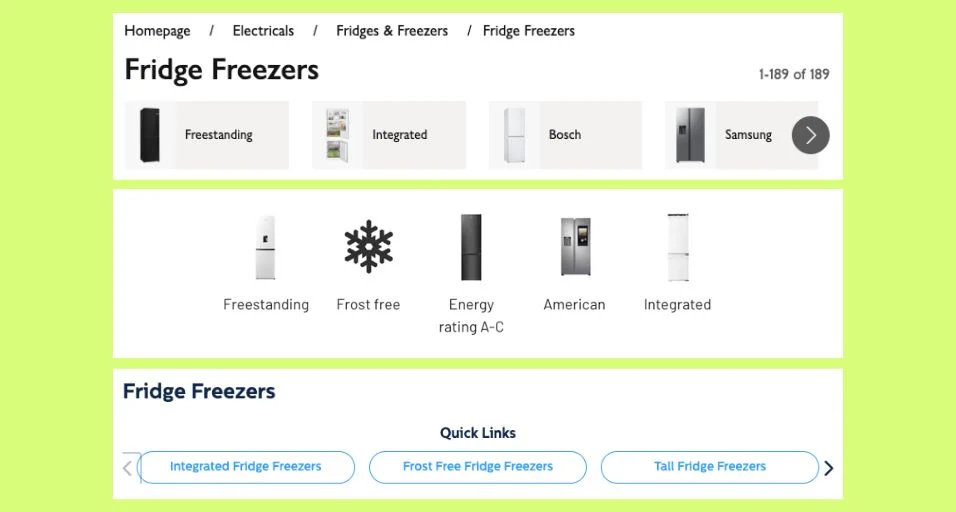
These were not buried in a navigation menu or threaded through paragraph copy. They were direct, crawlable internal links that communicated the relationship between the parent category and its subcategories immediately, and they served the user’s most likely next action before anything else on the page did. That pattern was applied for the client, and the mechanism is straightforward enough that any team managing a category page can replicate it.
On product pages, the user-journey framing is equally useful. A user who has landed directly on a product page may not yet be ready to buy. The most useful links from that page are probably the parent category, a buying guide or comparison content for that product type, and access to reviews. These links serve the user who is still validating their decision. An arbitrary rule about how many links a product page should contain misses that entirely.
The same logic applies to auto-generated modules. Most “you may also like” and “frequently bought together” sections are populated by platform defaults or random generation. Getting deliberate about what those modules link to, making them editorially considered rather than algorithmically assigned, turns a passive feature into a genuine signal about the relationships between products and categories on your site.
The anchor text rules that most teams neglect
Anchor text is the visible, clickable text of a link. It matters because it tells both users and search engines what the destination page is about. Generic anchor text (“click here” and “read more”) tells them nothing useful. Descriptive anchor text (“freestanding fridge freezers”, “sofa buying guide” etc.) communicates exactly what the linked page covers.
That does not mean every link needs to be aggressively keyword-matched. The test is whether the anchor text honestly describes the destination page and reads naturally in context. “Browse our full range of freestanding fridge freezers” is useful anchor text. “We also sell freestanding fridge freezers, integrated fridge freezers and American-style fridge freezers” with every phrase linked is the kind of copy that reads like SEO text and performs like it too, which is unlikely to be particularly well.
The canonical URL point from the previous section applies here too. If your anchor text and your destination are both correct but the URL you have linked to is a filtered or sorted version of the page, you are relying on Google to consolidate the signal rather than sending it cleanly. Both elements need to be right.
The three things to check before anything else
If you have a crawl report in front of you and are trying to work out where to start, these are the three areas that we consistently look at across e-commerce audits, because they are almost always present and are always fully within your team’s control.
Orphaned pages with no internal links
Crawl your site and cross-reference the results against your sitemap. Then either connect the Google Search Console and Google Analytics APIs or look at pages in there, because pages listed in your sitemap are the easy half of the problem. The pages that are in neither your sitemap nor your link graph, and that only show up because they once received traffic or impressions, are the ones a crawl alone will never surface. Prioritise what you find by the commercial or search importance of the page, not by the order it appears in the report.
Broken links into high-traffic or high-importance pages
A link from an important page to a destination that no longer exists strands the user and wastes the link. This is especially costly when the broken link sits in your main navigation or on a high-volume category page, because that same broken link is repeated across your whole site. Fix these before working on anything more strategic.
Breadcrumbs that do not actually link
Breadcrumbs are one of the most straightforward internal linking improvements available to any e-commerce site, and one of the most frequently broken. They should be implemented as live, clickable links through every level of your site hierarchy. If yours are rendered as plain text or are missing links at any level, fixing that is a quick, high-value task that directly helps both users and crawl efficiency.
Beyond these three, the work becomes more about judgement than about finding errors: thinking through the user journey on your most important pages, getting deliberate about what your cross-sell modules link to, and making sure that any new pages you create have relevant internal links pointing to them from day one rather than being added to a sitemap and left to be discovered by chance.
Internal linking done well is not an SEO exercise layered on top of your site. It is a navigation decision that search engines reward because it reflects what users actually need. That is the framing that makes every specific decision considerably easier to get right.