

Most title tag guidance covers everything and helps you prioritise nothing. You get a checklist of character limits, a warning about keyword inclusion, and a reminder to include your brand name. What you rarely get is a clear answer to the only question that actually matters for your store: where should you spend your time?
Our advice here is built from client work across a range of e-commerce markets, including white goods, fashion, pets, and home and garden, as well as a controlled split test we ran across roughly 700 pages.
Key takeaways
- Focus your title tag effort on category pages first, then your most important product pages.
- Google will sometimes replace your title in the results – relevance is what keeps your version in place.
- The most common category page mistake is stacking synonyms.
- On product pages, add specific model codes and SKUs where people actually search by them.
- Most title changes in our controlled test did not beat their control. One formula did.
Why title tags still matter for e-commerce (and what has changed)
The title tag is the first thing a user sees in the search result. Treat it as promoting a product, not labelling it. Its job is to earn the click.
The dynamic has shifted in one important way. Google will sometimes generate its own title link for a result, usually when your tag is empty, boilerplate, stuffed with keywords or very long, and where a title is overly long it tends to select the most relevant part rather than rewrite it wholesale.
It still uses the title you wrote the large majority of the time, around 87% by Google’s own account. So you are no longer setting a fixed label you own permanently, you are giving Google enough that it leaves your version alone. The goal is relevance first, everything else second.
Character limits and keyword density are secondary concerns. A title that is slightly longer but genuinely relevant will survive more reliably than a tightly trimmed title that buries the key term.
The two page types worth your time
For e-commerce stores, only two page types really matter when it comes to title tags: category and collection pages (product listing pages), and product pages (product detail pages).
Everything else – your about page, your delivery information page, your blog archive – sits below these in priority by some distance.
Collection pages typically target terms that carry the highest search volume and drive the widest reach. Product pages capture specific, ready-to-buy searches from users who have already narrowed down what they want.
Both have distinct problems, and they need different fixes. Do not treat them the same.
Collection pages: intent first, synonyms last
The most common mistake we see on category page title tags is synonym stacking.
A store selling sofas titles its main category page “sofas, couches, and settees” because someone in a keyword tool found all three terms and wanted to cover them. Google relates these to the same concept, so the customer essentially reads it as “sofas, sofas, sofas” and moves on.
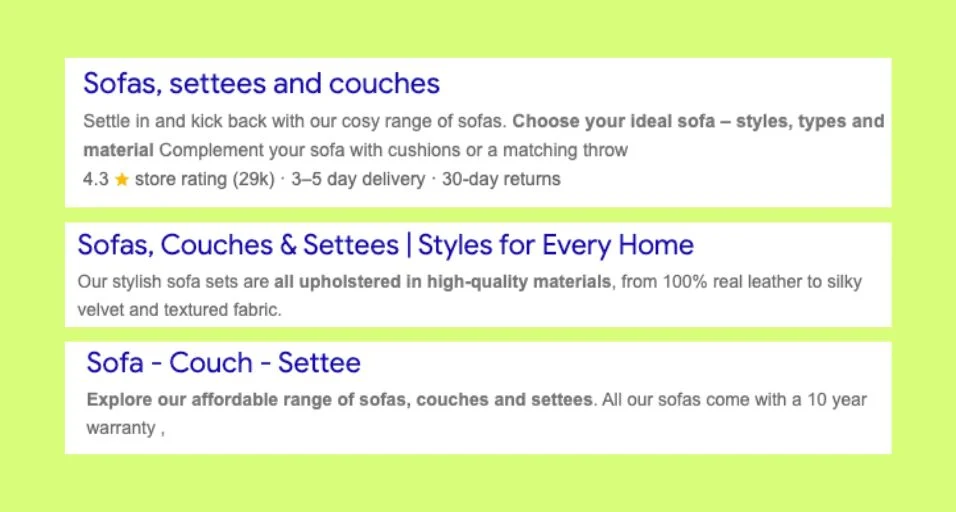
Choose the primary term your customers actually use, add a genuinely related term only where it adds meaning, and stop there.
Using related terms naturally in your page content still has value for coverage and relevance; it is stacking them in the title specifically that does not. Google’s understanding of language is sophisticated enough that a well-structured page ranks for related terms without needing them listed in the title.
One practical note on brand placement. Google truncates titles to fit the display, so a long title can lose its tail, and Google may also add your site name back into the result where it judges that helpful (Google Search Central: Influencing title links). The point is not that the brand stops mattering, it is to keep brand mentions short and lead with the category term, rather than padding the title and relying on the URL to carry the brand if it gets cut.
Product pages: specific detail up front, brand language out
On Shopify, product page title tags are auto-generated from the product name combined with your store name, not the product name alone, and there is a separate, editable SEO title field you can override independently. On large catalogues, leaving the default is understandable. It is also where most stores quietly create problems, because that editable field is exactly the one they never touch.
The specific detail that matters most on a product page is the product name, and the model number or SKU where relevant. For a white goods client we worked with, adding specific product codes to title tags picked up measurable traffic that appeared clearly in Search Console. The reason is straightforward: once a user has found a product on a review site or a competitor, they search the code, not the category. They are not searching “integrated washing machine”; they are searching the exact model reference. Most stores miss this entirely.
Two other things most product page title tags get wrong. First, USPs. Getting “next day delivery” or “free delivery” into a product title is not just about keyword relevance. It gives the user a reason to click before they have even reached your page. The title tag’s job is to earn that click, and a specific USP does that far better than generic brand fluff.
Second, variant duplication. Auto-generated title tags often mean that colour and size variants of a product share a single title template, because colour and size are handled as filters rather than title variables (especially on Shopify). Each variant may have its own indexable URL. A user searching for the yellow version may land on the black one instead, or not find your page at all. Making variant titles unique, even slightly, is a practical fix most stores have not made.
What a controlled test across 690 pages actually showed
Between February and June 2026, we ran a controlled title tag split test across roughly 700 category pages for a content-creator subscription platform.
We assigned pages to a control group and variant groups across five title formulas, and measured each against its control using Google Search Console data across identical windows. We used a difference-in-differences approach deliberately, because seasonality moved all groups in each period and a simple before-versus-after comparison would have been misleading.
The headline finding: most title changes did not beat their control. Title tag testing is not a guaranteed uplift, and any guide that implies otherwise is not being straight with you.
One formula clearly outperformed. The version that led with the specific modifier (the format or software the user was searching for) and kept the brand at the end grew clicks 6.9% and impressions 8.8% over three weeks, while comparable control pages fell 16% and 11% in the same window. Average rank improved from approximately 16 to approximately 11.6, the largest rank gain of any group in the test.
Redundant words added nothing. Adding qualifiers like “download” or “templates” to titles that were already clear did not improve performance and in some cases slightly underperformed the control.
James Mechan, Strategy and Delivery Director at WE-COM, who led the test said:
“The most important thing the test showed us is that most title changes are neutral at best.
“One formula did win clearly, and it was the one that put the specific term the user was searching for right at the front. But we ran five variants and only one beat its control. That should change how you think about the effort you put into this. Focus it on the page types and formulas that have evidence behind them, and do not expect every change to move the needle.”
One caveat to state clearly: the pages in the winning group started lower ranked than some other groups, which means part of the rank improvement may be regression to the mean rather than a direct effect of the title change. We present it as the strongest signal in the test, not as proof of causation.
What to ignore
Yoast’s traffic-light score as your quality check. Its readability analysis is built for a general audience and generic writing signals like sentence length and passive voice. Its WooCommerce plugin does add some product-specific checks, so it is not blind, but a generic green light still cannot tell you whether it’s a good product title. Get the substance right and do not get blinded by the lights.
Character count as a primary concern. “Keep it under 60 characters” is not a strategy. Relevance is what keeps Google from replacing your title, not length alone. A precise, slightly longer title will usually survive better than a vague short one.
Over-protecting the brand on category titles. Keep brand mentions short and lead with the category term. Google truncates to fit and may re-add your site name itself, so padding the title to defend the brand works against you.
Synonym stacking in the title. It reads as noise to users and adds nothing, because Google already relates those terms to the same idea.
Where to focus if you have a large catalogue
You cannot manually review every title at once, and you shouldn’t try. Work through this order.
- Start with your highest-traffic category pages. Pull them from Search Console, sorted by impressions. These carry the most search volume and the synonym problem is most likely to be there.
- Move to the product pages with the strongest impressions-to-clicks gap. A page drawing significant impressions but a low click-through rate often has a title that is not earning the click. Check whether the title is vague, front-loaded with the brand name, or missing a USP.
- Identify your most commercially important products and any you are actively promoting. These deserve manual attention regardless of their current Search Console data.
- For your remaining product catalogue, Shopify and Magento both support CSV bulk upload for title tags. A cleaned-up title template, even a simple one that pulls the product name and a relevant category term, is a better baseline than the default auto-generated output.
If you find variant duplication across colour or size pages, treat that as a separate task and work through it product category by product category, starting with your highest-traffic lines.
Title tags for e-commerce sites are one of the most discussed and least prioritised areas of organic search. The guidance rarely tells you which page types actually matter, and it almost never tells you that most changes will not move the needle. Our test confirms both of those things.
Focus the effort on category pages and your key product pages, lead with the specific term your customer is searching for, and remove the things that add noise without adding meaning.